Creating a chat for the site
Sales begin with the first contact of a site visitor with a manager; investments in SEO channels, contextual advertising and promotion through targeting will only increase traffic. Therefore, it is important for businesses to have tools on their website that guide paying visitors down the sales path. One solution is to create a chat on the site.
Contents of the article:
What is online chat
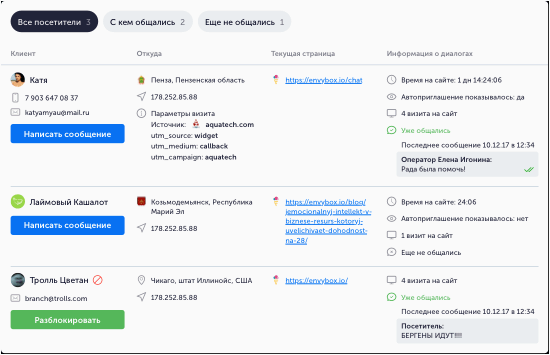
Feedback forms, call buttons, email addresses and other contact information & mdash; even worse. They do not have communication interactivity. However, online chat rooms do. Technically, this is a widget connected to a website template: a POP-UP notification invites you to start a dialogue and leaves a contact for a call.

Chat features:
- Real time communication;
- Operational support for site navigation;
- Brief recommendations on product availability;
- Resolve other pressing issues.
The system is familiar from such instant messengers as WhatsApp and Telegram. This avoids barriers between sellers and buyers. In addition, there is no need to wait for the manager to process the request received from the feedback form. This creates confidence that the visitor will help him with any problem at any time. Thanks to this approach, the loyalty of potential customers increases.
Through personalization of live invitations and chats, effective communication with clients generates 3. 2 times more calls from the site than other online consultants
Why do you need chat?
And these are not all the advantages of chats on the site. Easier to share digital information, model names and account numbers. The widget also supports sending files in the form of images, text messages and voice messages. Managers communicate freely and simultaneously with two or more clients Chat for the site chat is a tool for increasing conversions at the funnel stage after clicking on an ad or link in a search. Traffic is always limited by semantics and advertising budgets, which leads to the decision to increase revenue per visitor. Chat user statistics show that their use increases the average order value, saves time on product returns, reduces the risk of complaints, and reduces the number of negative reviews because people wait longer for responses. Customers are processed at the moment of “hot” interest, not later, when there are other urgent questions or a competitor could be involved.


Business benefits
Chat dialogue is usually much shorter than over the phone. Both the customer and the manager can carefully formulate questions and answers. Conversations are constructive, sometimes without emotion, which is a characteristic of the telephone. Furthermore, statistics collection comes into play—it’s an employee management tool.

The business manager (owner) receives:
- Reduced order processing costs;
- Possibility of online communication;
- Creates the basis for a newsletter. The latter is particularly interesting in terms of reducing the cost of the app. While a lead might initially come through relatively expensive contextual advertising, the average cost of acquisition will only decrease after sending an email, when the lead is converted into a customer. Without bots, collecting contact information must be done manually.
How to Make Chat Effective
How to make chat effective
Prepare a list of frequently asked questions. A chatbot can automatically send answers to them;
- Connect chat to your CRM and e-commerce systems; integrate the channel with Chrone’s Stuel Analytics system to receive up-to-date data on sales team performance and detailed reports;
- API. This significantly simplifies integration with third-party services.
- When coordinating technical specifications and creating chats on the site, the question arises: what is the cost of technical specifications? The answers will impact cost, speed of development and implementation. It is better to discuss this with your manager so as not to forget important technical details. It is best to rely on the experience of an expert and his recommendations.
Special Live Chat Features
Special Live Chat Features
Is integration with design necessary?
Is integration with design necessary?
Key Point:
The chat should look organic on desktop computers and smartphones;
- It’s better to personalize the invitation to communicate as much as possible;
- Widgets for all tasks must be created immediately.
- Chat was originally designed for sales managers, but its newest counterpart has become an analyst tool and the basis for making administrative decisions and marketing activities. Therefore, every detail must correspond to the widget design, which significantly affects the usability of the site.
Ready-made solution or separate development?
Ready-made solution or separate development?
Open source, no restrictions;
- Full integration with the company’s IT infrastructure;
- The program exactly matches business processes.
- Products developed for a specific client have exactly the functionality required at the time of implementation. There are no additional options. As necessary, new parameters are introduced to take into account business details and ensure the confidentiality of commercial information. Once created, access can usually be configured immediately. Custom chat rooms can give you an edge over competitors who use generic software or no software at all. After all, the shorter the sales path on a website, the faster prospects can be categorized and the greater the percentage of visitors who become customers. In addition, reviews from regular customers are more effective.
Stages of creating a chat for the site
Stages of creating a chat for the site
Development procedure:
Collection and analysis of requirements;
- Development and approval of technical specifications;
- Writing code;
- Software testing.
- If at the last stage the client expands the list of requirements and realizes that he missed an important point when agreeing on the technical specifications, improvements can be made. This slightly increases the cost of implementing the software, but the results are exactly what you want.
All that remains is to implement the chat, train staff and continue cooperation within the framework of consultations and technical support. However, it is recommended to start the project with a preliminary review. When you call, your manager will tell you where to start and what data to provide for the initial analysis.
Creating a chat for the site